ChatGPT accounts used to feel like ordinary app logins with a very strange superpower behind them. That is getting harder to defend. For a lot of people, the account now touches draft strategy, code, files, customer notes, research, browser context, connectors, and in some cases Codex. That is not a toy login. That is a little keyring with a model attached.
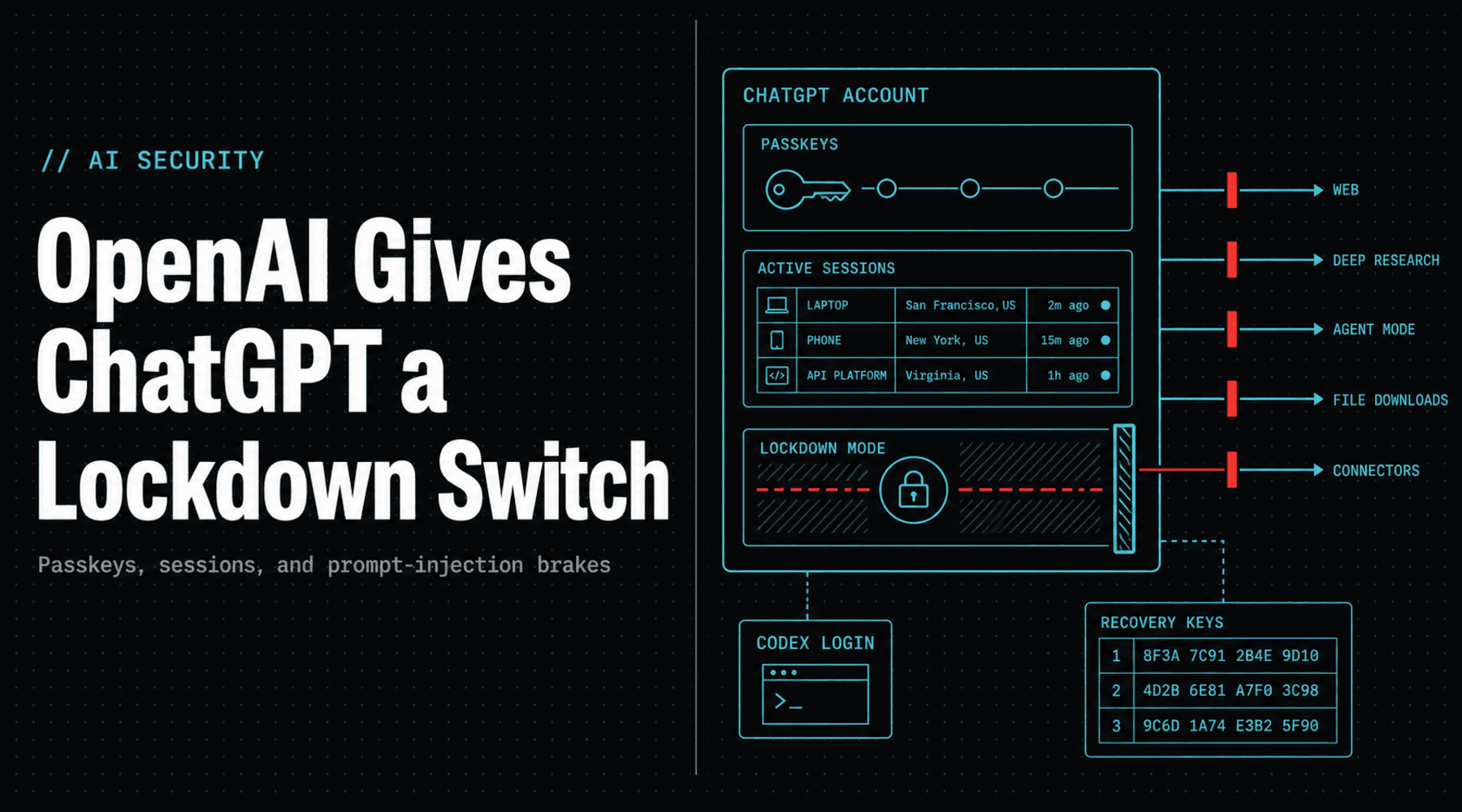
OpenAI's newest account-security push is interesting because it treats the account like the thing it has become: a work surface, a memory surface, and sometimes an agent surface. The company is rolling out broader access to Lockdown Mode and Active sessions, while its Advanced Account Security setting adds passkeys, physical security keys, shorter sessions, login alerts, stricter recovery, and automatic training exclusion for enrolled accounts.
The short version: ChatGPT is getting less like a chat tab and more like a cockpit with circuit breakers.
The New Switch
Lockdown Mode is the loudest control because it changes what ChatGPT is allowed to touch. OpenAI describes it as an advanced setting for people and organizations handling sensitive data who want stricter protection from prompt-injection data theft. It does not magically remove malicious instructions from the documents or web pages ChatGPT reads. Instead, it tries to block the last and nastiest part of the trick: sending private information out through a live tool, network request, connector, or file workflow.
When Lockdown Mode is on, live browsing is limited to cached content, deep research is disabled, agent mode is disabled, Canvas-generated code cannot be approved for network access, and ChatGPT cannot download files for data analysis. Image generation can still work, and manually uploaded files can still be used, but the outbound lanes get narrowed hard.
That trade is exactly the point. If you are asking a model to summarize sensitive files or operate near connected systems, capability is not always your friend. Sometimes the correct setting is: please be useful, but do not go outside.
Active Sessions Fix the Boring Problem
The less cinematic feature may matter just as much. Active sessions gives users a place to review signed-in browsers and first-party OpenAI app sessions, including context such as ChatGPT, Codex, or the API Platform when available. Rows can show device or browser information, approximate location, sign-in time, trusted-device status, and whether the session is current.
That sounds mundane until you remember how many security incidents are just boring sessions that lived too long. A forgotten browser on a shared machine. A phone that went missing. A laptop that was sold, recycled, or handed to a contractor with the wrong profile still warm. This is not spy-movie stuff. This is the dishwasher leak of account security, and it ruins the floor anyway.
OpenAI also keeps a separate global logout path for ChatGPT and the API Platform. ChatGPT sessions may take up to 30 minutes to flush across devices, while API Platform sessions are described as closing immediately. That distinction is worth knowing, because developers often assume every logout button behaves like an emergency brake. Some are closer to a polite request with a timer.
The Passkey Layer Is the Adult Table
Advanced Account Security is the serious version of the story. Once enabled, it requires passkeys or physical security keys and disables password-based login. It also turns off email and SMS recovery, replacing them with backup passkeys, security keys, and recovery keys. OpenAI says support cannot recover enrolled accounts if those stronger recovery paths are lost.
That sounds harsh because it is. It is also how high-value account security works. Email recovery is convenient until your email is the thing an attacker controls. SMS recovery is convenient until the phone number becomes the attack path. Advanced security means accepting that you can lock yourself out if you treat recovery keys like a receipt from a sandwich shop.
OpenAI also says Advanced Account Security applies to Codex when the same ChatGPT login is used. That matters. A compromised ChatGPT account is no longer just an embarrassing chat-history problem if the same identity touches coding agents, repos, terminals, or connected workspaces. AI account takeover is becoming closer to developer account takeover, with extra context and fewer obvious seams.
Prompt Injection Is Moving From Theory to Settings Page
The useful shift here is not that OpenAI has solved prompt injection. OpenAI is explicit that Lockdown Mode does not prevent prompt injections from appearing in content, and it does not guarantee that exfiltration can never happen. Risk can remain through enabled apps, new techniques, and weird combinations of features.
The useful shift is that prompt-injection risk is becoming something users and admins can operate. A few years ago, the usual advice was basically: be careful with untrusted text, which is true in the same way that be careful with electricity is true. Now the product surface is starting to expose real knobs: cached browsing, no agent mode, no deep research, no file downloads, app action controls, session review, passkeys, recovery keys, and login alerts.
That is healthier than pretending one giant model-safety blanket can cover every workflow. A student asking for help with calculus, a journalist reading leaked PDFs, a lawyer reviewing discovery, a startup founder connecting Google Drive, and a security researcher using Codex do not need the same risk profile. One product can serve all of them only if it gives them different blast radiuses.
The Fun Part Is That It Makes AI Less Magical
For years, the sales pitch around AI tools has been friction removal. Connect more apps. Browse more pages. Let the agent click more buttons. Give it a longer memory. Let it operate across your work life like a clever intern who never sleeps and occasionally quotes a fake library.
Lockdown Mode is the opposite muscle. It says the most advanced workflow is sometimes the one with fewer exits. That is a good sign. Mature tools do not just add horsepower. They add brakes, dashboards, warning lights, maintenance modes, and ugly little toggles that make administrators feel something other than dread.
The next obvious step is making these controls easier to reason about in teams. A workspace should be able to say: this group can use live connectors, this group can use only synced read access, this group cannot use agent mode near regulated files, this group must use phishing-resistant auth, and this risky action needs a second human. Not because humans are pure and models are scary, but because systems with consequences need controls that survive normal human chaos.
The Takeaway
OpenAI's ChatGPT security controls are not flashy in the usual product-launch way, and that is why they are worth watching. They acknowledge that AI accounts are becoming infrastructure. They hold sensitive memory, connect to external services, authorize agents, and increasingly sit near real work.
A password plus vibes is not enough for that. Passkeys, session maps, recovery keys, and a Lockdown switch are the right kind of boring. They make ChatGPT feel less like a floating chat bubble and more like software that knows it has keys in its pocket.
// Discussion
Comments
No comments yet. Start the thread.