Homebrew 6.0 is not the sort of release that tries to look dramatic. No fireworks, no mascot with sunglasses, no grand speech about reinventing software. It does something more useful: it makes a package manager ask, in plain terms, whose code gets to run on your machine.
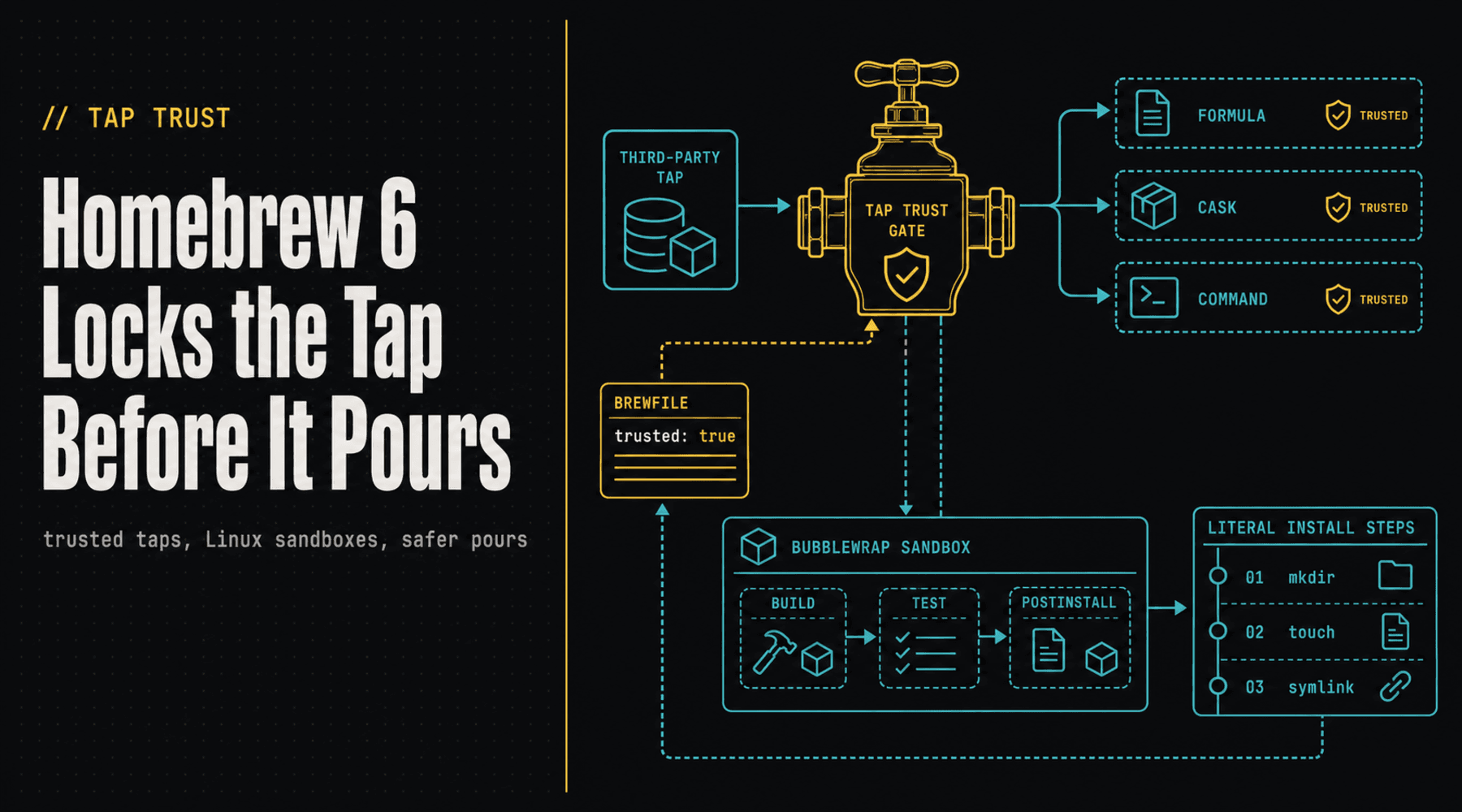
On June 11, Homebrew shipped 6.0.0 with a new tap trust system, a default internal JSON API, Linux sandboxing, stronger install defaults, and a pile of bundle and performance work. The headline item is tap trust because taps are not just lists of software. A Homebrew tap can carry formulae, casks, and commands, which means Homebrew may evaluate Ruby code from that repository while resolving dependencies, finding packages, or running commands.
The old mental model was almost too cozy: add a tap, install a thing, move on. Homebrew 6 makes the tap knock first.
The Tap Is Code, Not Catalog Paper
Homebrew's new documentation is blunt about the risk. Official Homebrew taps and built-in commands are trusted by default. Non-official taps must be explicitly trusted, and the docs push users toward trusting the smallest useful unit: a specific formula, a specific cask, or a specific command instead of a whole third-party repository.
That distinction matters. Trusting user/repo is a standing invitation for everything in that tap now and later. Trusting user/repo/formula is much narrower. In a world where maintainers get phished, repositories change hands, package names collide, and AI agents may happily paste an install command they half-understand, that narrower trust boundary is not pedantry. It is seatbelts.
The new workflow also reaches into automation. Brewfile entries can include trusted: true, and brew bundle will honor that trust declaration before installing. That gives teams a clean way to say, in code review, exactly which non-official sources a workstation bootstrap script is allowed to load.
Linux Gets the Sandbox Treatment
Homebrew on macOS has long run build, test, and postinstall phases inside a sandbox. Homebrew 6 extends that protection to Linux with Bubblewrap. That closes an awkward gap for the growing number of people using Homebrew on Linux, WSL-adjacent setups, Steam Deck-style environments, and developer images that treat brew as the same comfortable command everywhere.
The point is not that sandboxing makes malicious code impossible. It does not. The point is that build and install phases should not get casual access to every interesting file in your home directory. Homebrew's supply-chain docs call out sensitive-path protections and environment filtering for exactly this reason. Your shell history, SSH keys, cloud tokens, and weird old .env files should not be party favors for a compromised build script.
That is especially important because developer machines have become soft control planes. A laptop is not just where code is typed. It holds Git credentials, package tokens, cloud CLIs, CI secrets, browser sessions, local databases, AI agent workspaces, and the one yak-shaving script everyone swears they will delete next sprint.
The Fast Path Also Got Safer
Security releases sometimes punish users with friction and call it discipline. Homebrew 6 is more interesting because it pairs the new guardrails with speed work. The internal JSON API is now the default, combining Homebrew metadata into a smaller, faster network path. brew bundle gets parallel formula installation by default. brew leaves is roughly 30 percent faster. Ask mode becomes the default for developers, showing a dependency plan and confirmation before installs and upgrades make changes.
There is a design philosophy hiding in that mix: make the safe path the fast path, or at least not the annoying path. If a tool makes security feel like a tax, developers route around it. If a tool quietly narrows trust while shaving time off common operations, people keep using the tool and get the benefit by default.
Install Steps Are a Big Deal in Boring Clothing
One of the least flashy Homebrew 6 changes may become one of the most important. The release adds an install steps framework that can express common preparation, postinstall, preflight, and postflight behavior as ordered, literal DSL data exposed through the JSON APIs. For simple file operations, a formula or cask does not need to download and evaluate a Ruby file just to touch a marker, create a directory, move a file, or wire up a symlink.
That is a lovely kind of boring. The safest code is the code you do not have to execute. Turning routine installation behavior into declarative metadata shrinks the dark corner where surprise logic can hide. It also makes package behavior easier to inspect, cache, lint, and eventually hand to tools that are better at checking data than reading another tiny snowflake script.
This is where Homebrew 6 feels bigger than Homebrew. Package managers are slowly relearning that executable install hooks are expensive privileges. npm and PyPI have shown what happens when instant publishing, maintainer account compromise, lifecycle scripts, and massive dependency graphs meet in a dark alley. Homebrew's model is different: human-reviewed formulae, checksummed downloads, Homebrew-built bottles, sandboxed install phases, and now tighter third-party tap trust.
The AI Agent Angle Is Obvious
Homebrew also published responsible AI usage guidance for maintainers and contributors. The instructions are sensible: AI output is the human's responsibility, review the diff, run the tests, disclose assistance, and use AGENTS.md when repeated prompting teaches a tool local project rules.
The sharper point is that package managers now have to assume software may be installed by agents as well as humans. An agent can read docs, compose a bootstrap script, trust a tap, run a command, and forget why it did that five minutes later. Tap trust gives humans a reviewable artifact instead of a shrug. trusted: true in a Brewfile is not just a flag. It is a little receipt for a decision that would otherwise disappear into terminal scrollback.
The Takeaway
Homebrew 6.0 is a good reminder that supply-chain security does not have to arrive wearing a helmet and shouting acronyms. Sometimes it looks like a package manager asking whether a third-party repository should be trusted, sandboxing Linux builds, filtering sensitive environment data, slowing down risky ecosystem bumps, and making common operations faster at the same time.
That is the practical version of security. Not perfect. Not magical. Just fewer open doors, better labels on the doors that remain, and less temptation to prop them open because the secure route is too slow.
If your bootstrap scripts still tap first and ask questions never, Homebrew 6 is the polite little clink of a glass on the counter. Time to look at what you have been pouring.
// Discussion
Comments
No comments yet. Start the thread.