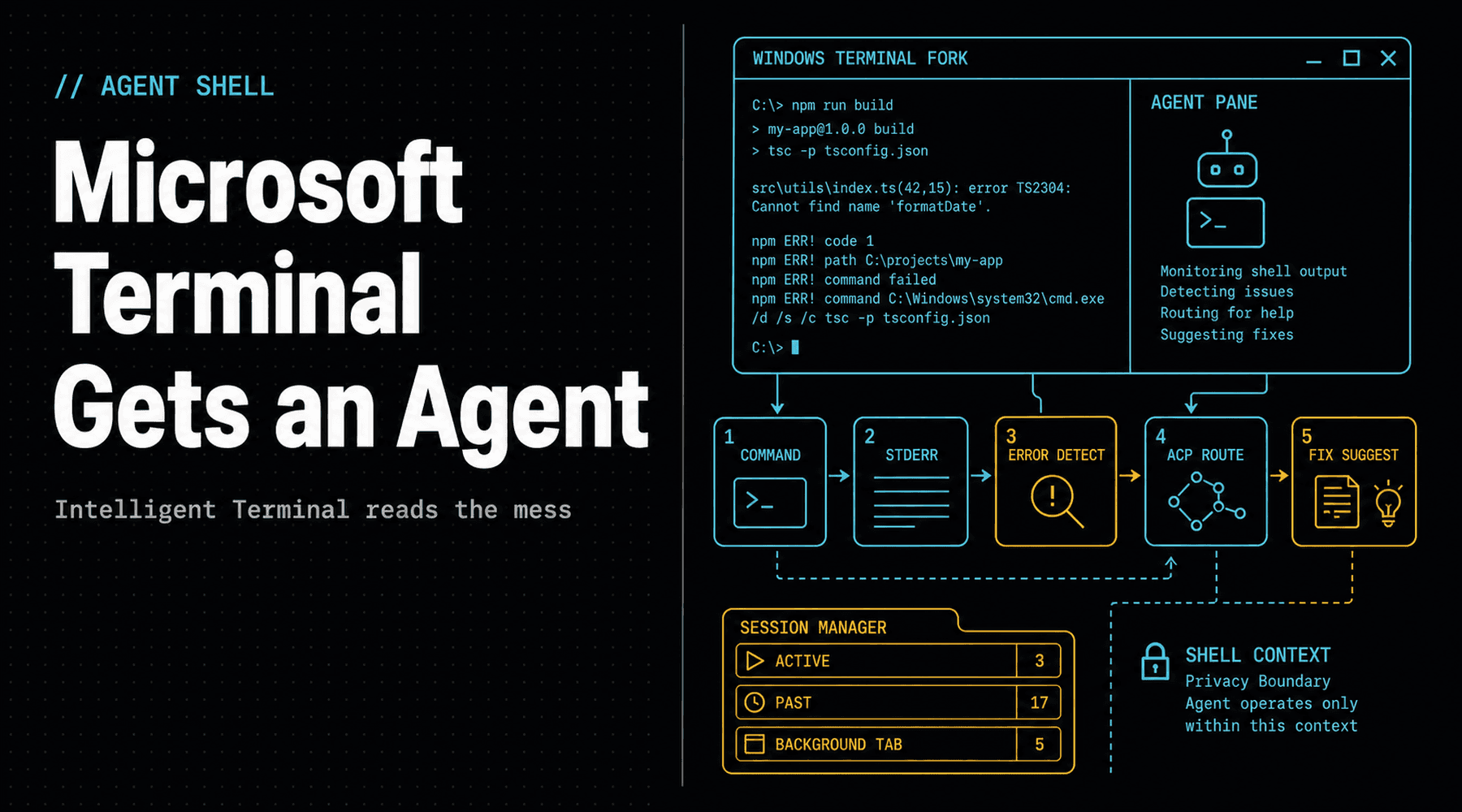
The terminal has always been the place where software stops smiling for the camera. It is where installs fail, flags are misspelled, paths go missing, builds explode, and a developer gets to stare at a wall of stderr like it personally betrayed them.
Microsoft's new Intelligent Terminal 0.1 is built for that exact moment. It is an open-source experimental fork of Windows Terminal that adds a docked AI agent pane, automatic error detection, session management, and command-palette prompts. The normal Windows Terminal stays normal. The agent experiment gets its own seat.
Here is the short version: the rubber duck can read stderr now.
What Microsoft Shipped
Intelligent Terminal was announced by Microsoft's Windows Command Line team on June 2, 2026. It installs as a separate app, can be installed through the Microsoft Store or with winget install Microsoft.IntelligentTerminal, and is published in Microsoft's GitHub repo as a fork of Windows Terminal.
The product choice matters. Microsoft did not simply wedge a chatbot into the terminal everyone already uses. It created a separate build for people who actually want an agent inside the shell, while leaving mainline Windows Terminal alone for people who want their command line quiet.
The core feature is a docked agent pane with context from the active shell. GitHub Copilot CLI is the default agent, but the repo says Intelligent Terminal can work with Agent Client Protocol-compatible CLIs, including custom or local agents. BleepingComputer's hands-on setup showed choices such as GitHub Copilot, Claude, Codex, and Gemini in the first-run flow.
The Useful Part Is Not Chat
Generic chat beside a terminal is not especially new. Developers already keep a browser tab, a coding agent, a documentation page, and a shell open at the same time. The useful part is that Intelligent Terminal tries to make the shell state legible to the agent without the old ritual of copying an error, pasting it into a second app, explaining the folder, re-copying the suggested command, and hoping the model guessed the environment correctly.
When a command fails, Intelligent Terminal can detect it and light up an indicator in the agent status bar. Ctrl+Alt+. opens the agent pane with the error context already loaded. Ctrl+Shift+. toggles the pane. Alt+Shift+/ opens prompt mode in the command palette, injects context from the active pane, and can start an agent task in a background tab.
That turns the terminal from a text box into a small control plane:
- Shell output becomes machine-readable context, not a screenshot or pasted blob.
- Failed commands become a trigger for diagnosis instead of a context-switch tax.
- Agent sessions become resumable objects rather than mystery tabs you opened twenty minutes ago.
- Agent choice becomes part of terminal configuration instead of a hardwired Copilot-only story.
The Sharp Edge Is Context
The same thing that makes Intelligent Terminal useful also makes it worth handling carefully. Shell context is not harmless. It can include paths, hostnames, build logs, tokens accidentally printed by broken scripts, private repository names, customer identifiers, and enough environment trivia to make a security team twitch.
Microsoft's GitHub README is unusually plain about this. Intelligent Terminal is described as a local transport layer. It passes prompts and recent shell output to the selected agent CLI over stdio and ACP. Microsoft says the app itself does not call cloud APIs or persist conversation history, but diagnostic logs and telemetry may be written, and the destination for agent data depends on the agent CLI the user chooses.
That is the right framing. The terminal is not a toy surface. If an agent can read what the shell is doing, then agent selection, error-suggestion settings, telemetry defaults, and enterprise policy all become real deployment questions. A local model wired through ACP is a different risk profile from a cloud agent with broad workspace context. Both may be fine. They are not the same thing.
Why This Feels Bigger Than Version 0.1
Intelligent Terminal is not only a product preview. It is Microsoft admitting where agent work is heading: closer to the place where work actually breaks.
IDE agents are powerful, but plenty of software work happens outside the editor. A migration fails in PowerShell. A package script dies in WSL. A cloud CLI complains about a region flag. A test runner leaves just enough breadcrumbs to ruin lunch. The command line is where the messy middle lives, and that is where an agent with context can be more useful than a polite autocomplete box.
The separate-app strategy is also smart. It gives Microsoft room to experiment with agent behaviors, background tabs, automatic suggestions, ACP plumbing, and privacy controls without turning the main terminal into a mandatory AI billboard. Developers who want the experiment can install it. Developers who do not can keep their shell boring, which is one of the most underrated features a tool can have.
The Takeaway
Microsoft Intelligent Terminal is a small release with a big interface idea: agents should not just live in chat windows or IDE sidebars. They should be able to sit next to the system surfaces where real failures happen, read enough context to help, and stay out of the way when the human already knows what to do.
The win is not that the terminal can talk. The win is that the terminal can hand an agent the right mess at the right time. If Microsoft keeps the fork optional, keeps agent choice open, and treats shell context like sensitive material, Intelligent Terminal could become one of the more practical agent experiments on Windows.
// Discussion
Comments
No comments yet. Start the thread.